Best Virtual Staging Software in 2026: 7 Tools Compared

For a few photos at the lowest cost, start with a tool that lets you stage before you pay: Styly gives 3 free images with no signup, then €5 for 30 more. For an agency staging listings every week, a subscription priced per photo works out cheaper. If you need a human editor and accept paying per image, BoxBrownie charges €30 per photo. Every price below was read on the vendor's own page on 15 October 2026. Where a page does not say something, we write "not stated".
Virtual staging software at a glance
| Tool | Free to try | Entry price | Furniture removal | French |
|---|---|---|---|---|
| 1StylyOur product | 3 images, no signup | €5 for 30 images | Yes | Yes |
| 2Virtual Staging AI | Yes, count not stated | $16/mo yearly, 6 photos | Yes | No |
| 3REimagineHome | 5 designs, no card | $14–$19/mo, 30 credits | Yes | No |
| 4Collov AI | 1–5 trials, watermarked | $19/mo, 60 photos | Yes | No |
| 5HomeDesigns AI | 3 credits every 24h | $9/mo yearly, 100 credits | Yes | Yes |
| 6Apply Design | First image free | $7–$10 per coin | Yes | No |
| 7BoxBrownie (human) | No | €30 per photo | €5–€10 extra | Yes |
Vendor pages as read on 15 October 2026. Scroll sideways on mobile →
How this comparison was put together
Prices, free allowances and features were read from each vendor's pricing and product pages on 15 October 2026 and are quoted in the currency each vendor shows. Styly is our own product. We did not run the same photo through all seven tools, so this page compares what each vendor publishes, not output quality. Prices change often; check the vendor's page before you buy.

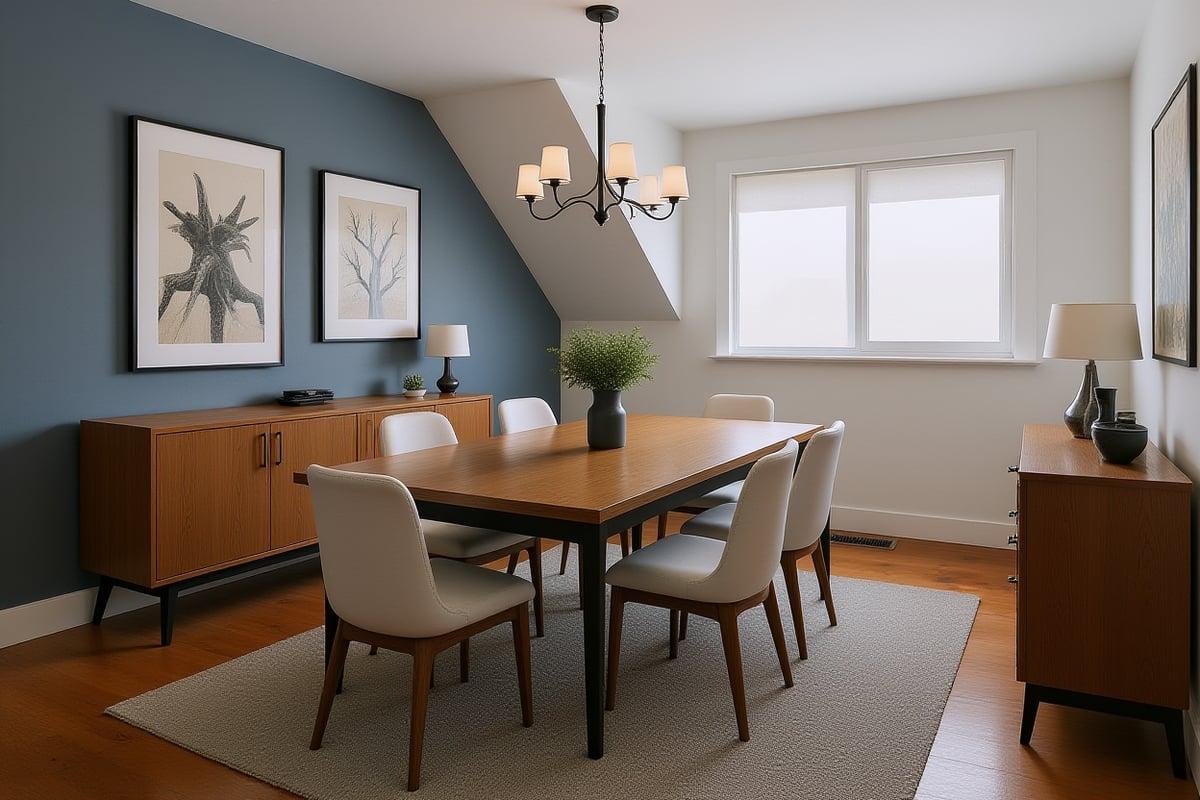
The empty attic room used for the two Styly stagings shown below.
The 7 tools, one by one
What each tool costs, what the free tier really gives you, and where it falls short.
Styly
Cheapest way to startUpload a photo, choose the room type and a style, and Styly furnishes it while keeping the walls, window and floor of the photo. Home Staging and Furniture Removal are both in the free plan. After the 3 free images you can buy 30 credits for €5 with no subscription, and credits never expire. Starter costs €19/month for 150 images and comes with a 7-day free trial.
- Stage before you pay, without creating an account
- One-time credit packs, no subscription needed
- Furniture removal included on every plan
- Site and app in English and French
- The free plan is 3 images in total, not per day
- No human retouching service
Virtual Staging AI
Built for listingsVirtual Staging AI is made for estate agents and says it "leaves room layout untouched". You can try it without signing up or adding a card, but the page does not say how many free images you get. The Basic plan is $16/month billed as $192 a year for 6 photos, about $2.67 per photo; larger plans bring that down to $0.53.
- Try without an account or card
- Furniture removal included
- Per-photo price falls a lot on bigger plans
- The cheapest plan is billed yearly
- Number of free images not stated
- English only
REimagineHome
Most featuresEvery new user gets 5 free designs and no card is needed for the trial. The Essential plan gives 30 credits a month; its pricing page lists $14 in one place and $19 in another, most likely yearly versus monthly billing. It says outputs "preserve architecture" and offers both emptying a room and removing single objects.
- 5 free designs, no card
- Empty a room or remove single objects
- Some results link to real products
- Price shown differently in two places on the same page
- English only
Collov AI
Most trial optionsCollov's free trials depend on the feature: 1 to 5 tries, and some are watermarked. The Standard plan is $19/month for 60 photos, and unused photos reset each month. It includes furniture removal and a room declutter tool.
- Declutter and furniture removal tools
- Monthly billing available
- Free trials are small and some are watermarked
- Unused photos do not carry over
- English only
HomeDesigns AI
Free credits every dayHomeDesigns AI refills 3 free credits every 24 hours. Standard is $22/month, or $9/month billed yearly, for 100 credits with a commercial licence and no watermark. It says "your walls, windows and layout stay exactly as they are", and it can empty a room in one click. It has a French version of its site.
- Free credits come back every day
- Empty a room in one click
- French version of the site
- Headline price needs a yearly payment
- An extra one-time add-on is offered at checkout
Apply Design
Pay per imageApply Design has no subscription: you buy coins at $10 each, falling to $7 from 20 coins. A do-it-yourself staging costs 1 coin and one-click staging 1.5 coins, so roughly $7 to $15 per image. The first image is free and item removal is included.
- No subscription
- First image free
- Item removal included
- Much more per image than subscription tools
- English only
BoxBrownie
Human-editedBoxBrownie is not automatic: its own editors stage each photo, delivered in under 48 hours, with free revisions for two months. Staging costs €30 per photo with no subscription, and removing furniture costs €5 to €10 more. Its free offer covers photo enhancement, not staging.
- A person edits every photo
- Free revisions for two months
- Available in French
- €30 per photo, and removal costs extra
- Wait of up to 48 hours instead of seconds
Which virtual staging software should you pick?
Pick by how many photos you stage and how you want to pay.
Pick by situation
- You want to stage a few photos of one property: Styly. 3 free images, then €5 for 30.
- You stage listings every week and pay yearly: Virtual Staging AI or HomeDesigns AI, both cheap per photo on yearly plans.
- You want to test several free designs before paying: REimagineHome, 5 free designs without a card.
- You never want a subscription: Styly credit packs or Apply Design coins.
- You need a person to check every image: BoxBrownie, at €30 per photo.
Rules to follow when you publish staged photos
Many listing portals and agent associations ask you to say a photo is virtually staged and to keep an unstaged photo with the listing. Do not use staging to hide damage, change the view from a window or alter walls, floors or fixtures. Check your portal's own rules before you publish.
Frequently asked questions
Short answers to what people ask before choosing a staging tool.
Is there free virtual staging software?
Several tools let you try for free. Styly gives 3 images with no signup, REimagineHome gives 5 designs without a card, HomeDesigns AI refills 3 credits every 24 hours, and Apply Design gives your first image free. None of them is free without limits.
How much does virtual staging cost per photo?
On the pages we read on 15 October 2026, automatic tools range from about $0.53 per photo on large yearly plans to around $15 on pay-per-image coins. Styly's smallest pack is 30 images for €5. Human staging at BoxBrownie costs €30 per photo.
Can virtual staging remove existing furniture?
Yes. All seven tools here offer furniture removal. It is included in the price at Styly, Virtual Staging AI, Apply Design and HomeDesigns AI; BoxBrownie charges €5 to €10 extra.
Does virtual staging change the walls and windows?
It should not. Styly, HomeDesigns AI, REimagineHome and Virtual Staging AI all say they keep the room's layout. Always compare the staged photo with the original before you publish it.
Prompts for staging an empty room
If you stage with a general image model instead of a dedicated tool, the wording decides the result.
Stage a photo of your own room
Upload a photo, choose a room type and a style. Your first 3 images are free and need no account.
Stage a room free with Styly →